Tuesday, August 13, 2013

User Profile Service Application - Plan for Social tagging in SharePoint 2010


Social Tagging consist of Social Tags, Note Board, Ratings and bookmarklets.
Social Tags and Note Board can be associated with pages, library, items and much more. We can add tags and notes by using "Tags and Notes" control in ribbon (Farm feature "Social Tags and Note Board Ribbon Controls") which also has privacy setting. All these activities are visible in My profile under "Tags and Notes" tab.

Rating are associated with library and list for which we need to activate "SharePoint Server Publishing Infrastructure" feature. Go to list settings -> Rating Settings -> Allow items in this list to be rated - Yes. 

Sunday, October 7, 2012

Managing Security in SharePoint 2010 Based on Metadata


Managing Security in SharePoint 2010 Based on Metadata

The most robust way of keeping your SharePoint manageable is to keep it's structure clean and clear, though business often introduces some complex rules and convoluted workflows. Degree of complexity even increases when it comes to governance and security.

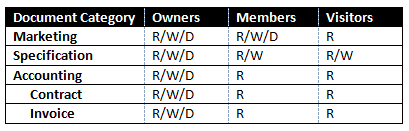
One task of such kind that business demands is to secure document based on the metadata values. In SharePoint 2007 it usually leads to custom development or purchasing one of the 3rd party products (like one from the Titus Labs), luckily SharePoint 2010 came up to help. Let's say we were asked to assign custom permission level on the document based on it's category, although to make it harder assume that document can have multiple categories.

The following picture shows security matrix to be implemented:

Here are the steps to achieve this using out-of-the-box Content Organizer feature, folder based security structure and Metadata Navigation.

1. Create "MD Document" content type
2. Add Managed Metadata column "Document Category" to the content type with the following Taxonomy
3. Add MD Document content type to a "Documents" document library.
4. Create three folders in a document library "Public", "Confidental", "Top Secret". Break permissions inheritance on these folder and assign desired permissions in accordance with security matrix.
5. Go to site settings and activate Content Organizer feature.
6. Add content organizer rule to route documents having Accounting category to a Top Secret folder.
7. Create rules for all category types. Less privileged category should have higher rule priority.

Starting from that point all documents that a user uploads to a Documents library will be processed by Content Organizer and placed in a secured folder based on a document category, i.e. secured based on the metadata.

A user will be informed by the following message in the upload document dialog:

And when category field is set up, document will be automatically routed:

Also, I like to use Metadata Navigation and Filtering feature in order to make navigation over categories more convenient. Activate this feature in Site Settings, go to document document library settings, then Metadata Navigation Settings and add Document Category column to the Selected Hierarchy fields. That will add a nice looking category tree to a documents list.

Tuesday, September 18, 2012

SharePoint 2010 Virtualization

With virtualization we can have multiple virtual servers(OS) on the single physical server. For example we can have web server, application server and database server on a single physical server.This approach not only help with cost reduction and maintenance but also with response time, high availability and scalability with business needs.

For SharePoint 2010 virtualization, Windows Server 2008 R2 with Hyper-V contains tool set which help to achieve reduces cost and increase performance.

Benefits of Virtualization:

1. Restore previous server instance: Administrator can take snapshot of the servers on timely basis so that if something goes wrong with server settings or installation, he can restore previous server's snapshot.
2. Virtualization tool-sets ensures that physical hardware like processor, RAM are used to the full capacity. For example: In a small physical farm, we have 2 web servers, 1 application server, 1 DB server. There are times when these physical servers are not used at full capacity. Virtualization handles these parameters dynamically in-turn increasing application's performance.
3. Multiple applications with different software requirement can sit on one physical server. For example: We have MOSS 2007 portal and SharePoint 2010 portal to deploy on PROD. We can create 2 different operating systems on same physical server using virtualization.          
4. We can scale up or down easily with virtualization. For example, a small organization can use virtualization to built small farm (2WFEs,1App,1DB) on single physical server and as organization grows they can easily add couple of physical servers instead of switch from stand alone to small farm. 
5. Dynamic memory distribution treats memory as shared resource that can be reallocated automatically among running virtual machines

Generally Indexing server and Database server are not virtualized because they actually consume all the resources of physical server and there is little scope of physical server's resource sharing using virtualization.

For virtualization best practices and configuration follow below link: http://www.microsoft.com/en-us/download/details.aspx?id=19508 

Thursday, August 23, 2012

SharePoint 2010 features


New Features in SharePoint 2010 are
1. SharePoint Health analyser
Quickly find and fix potential problems across all of the servers in your farm. The SharePoint Health Analyzer monitors farm health and can automatically fix many common configuration and performance problems automatically
2. Visual Upgrade
Upgrade to SharePoint 2010 but keep the SharePoint 2007 look-and-feel until you are ready to switch. Ribbon on page
3. PowerShell
4. Bookmarking, tagging and rating capabilities.
5. Content Type hub
6. Library item limit increased to 10 million from 5 million
7. Shared Service architecture changed to make it more flexible and ability to share accross farms. Every Service has have different user permissions. Services have there own DBs. Multiple instances of services allowed.
8. Web analytics capability enhanced
9. Sandbox
10. Can be installed on Windows 7
11. Workflows can be moved between Visio, Designer, Visual Studio. Site Workflow is new
12. New Event handlers
13. Claims based authentication
14. List Throttling
15. Developer dashboard
16. client object model, ECAMscript
17. Inline editing experience (Wiki page)
18. Managed Accounts
19. Multi-tenancy - Configuration: no CA, only by PowerShell scripts
20 RBS

MOSS 2007 to SharePoint 2010 migration


To perform an upgrade, you must have installed Office SharePoint Server 2007 with Service Pack 2 (SP2).

Inplace Migration and database migration
Need MOSS SP2 for migration. Pre Upgrade Checker to generate reports.
MOSS has 15,000 site collection limition for single DB whereas 2010 has 5,000 limition. So devide site collection into multiple db before upgrade.

We do have option to keep visual as 2007 for 2010.

Site Planning


SharePoint 2010 Versions: http://sharepoint.microsoft.com/en-us/buy/Pages/Editions-Comparison.aspx
Licensing Q&A: Determining Your Licensing Needs: http://sharepoint.microsoft.com/en-us/buy/Pages/Licensing-Details.aspx
Try Office 365 for free for 30 days: http://www.microsoft.com/en-us/office365/free-office365-trial.aspx#fbid=Z2H52GGA8QQ
Planning for server farms (SharePoint Server 2010): http://technet.microsoft.com/en-us/library/cc262936.aspx
Performance and capacity management (SharePoint Server 2010): http://technet.microsoft.com/en-us/library/cc262971.aspx

For intranet/extranet we need Client Access Licensing(CAL) Device/User based. In Production all instances of server needs SharePoint licensing. For development/staging server MSDN licensing is required.

In orginzation there can be 2 or more farm servers, 1. Intranet 2. Internet. Both have diffent licensing. We can install 2 license on the same farm. Extranet can include in either Intranet or Internet licensing. Intranet needs CAL.
1 farm can be dedicated to MYSITE if the users creating mysite are huge.

Small Farm - 2WFEs, 1 App server, 2 DB server(Search DB, other)
Medium Farm - Multiple WFEs, 2 App servers(Combined Query and crawl server, other services), 2 DB(search DB, other)
Large Farm - Mulitple WFEs(Seperate group for incoming request, group for crawling and administration), 4 group of app server(crawl, query, other, running sandbox code), 3 group of DB server(Search Server, Content DB server, others)

1 WFEs = 10,000 users, App server and DB depends on search and data.


Site collection are
1. Orgainzational sites: Combination of team site and publishing content site
2. Application sites: User interaction such as timesheet application
3. Publishing site: There is authorizing server, staging server and production server all in different web application for publishing content.

For single site collection DB cannot be more that 100GB(best practice) Here we have to split site collection into mulitple site collection if DB size goes more than 100BG.
By default every web application creates its own content db. While planning creating different site collection helps for scalability because if content db reaches 100GB we can move site collection to new content db by using Move-SPSite command.
Web application is used to redirect incoming http request to SharePoint sites. We should always consider below additional overheads before creating new web application.
1. Additional RAM required per Web app (even with 0 users) > more hardware required.
2. Timer jobs (around 30 per Web app, several of which run every few minutes (e.g. alerts & workflow) and many which run daily (e.g. workflow processing and gradual site deletions)
3. Content databases - per SQL instance limit, backup concerns, storage space
4. Application pools if isolating for security reasons
5. IIS sites > administrative overheads (host headers, IP addresses, SSL certificates, Web configuration files, assemblies).
6. Other operational overheads: DNS / request routing; SharePoint solution management

Multi-Tenancy can be done to web application as well as site collection. In 2010 we can do alternate access mapping to site collctions as well.
We can have 300 databases per web application.
Extend Web applications when you want to change authenication type or give different set of users different authentication and URL

SharePoint Logging


1. Gives the report for site and site collection usage information.

2. Unified logging service ULS logs - we can write custom logs by
SPDiagnosticsService diagSvc = SPDiagnosticsService.Local;
                diagSvc.WriteTrace(0,
                                                        new SPDiagnosticsCategory("Sowmyan's category", TraceSeverity.Monitorable, EventSeverity.Error),
                                                        TraceSeverity.Monitorable,
                                                        "Writing to the ULS log:  {0}",
                                                        new object[] { "SharePoint 2010 rocks!" });

3. Event logs - we can write custom logs by
 System.Diagnostics.EventLog.WriteEntry("Rahul", "Testing");

4. Store all logging information in new database from all the WFEs. So all logging info at one place.

5. customerrormode = off and CallStack=true to see the error call stack on page.

6. Custom applicaton page: there is new SPWebApplicaton.SPCustomPage enumerator which will replace OOB application page with custom page

webApp.UpdateMappedPage(SPWebApplication.SPCustomPage.AccessDenied,
          "/_layouts/CustomErrorPages/AccessDenied.aspx")

7. Develepor dashboard to view report of the page.