Tuesday, August 13, 2013

User Profile Service Application - My Site on SharePoint 2010

Plan and set up for MySite in SharePoint 2010 are as below:

1. One of the Best practice for setting up My Site is to create new separate web application with "My Site Host" template Site Collection at root level.

2. Configure wildcard inclusion managed path as 'personal' with this new web application

3. Configure My Site settings for User Profile Service application.

4. Enable Self-Service Site Collection for this new web application which allows auto site collection creation when user clicks on MyContent in MySite for the first time.

There are number of other factors involved in planning of My Site

User Profile Service Application - Plan for User Profile on SharePoint 2010

user profile is a collection of properties that describes a single user, along with the policies and other settings associated with each property. Some of the enterprise social networking feature that user profiles support are: my sites, profile pages, people searching, organizational charts, enterprise search, social tagging and audiences.

New user profiles are created in the following ways:

  • If an authenticated user does not have a user profile, a new one is created using properties taken from the appropriate directory service when that user initially accesses his or her My Site.
  • One or more new user profiles can be created using profile synchronization.
  • custom solution can be developed to create user profiles. 
A user profile is composed of a set of user properties. Each user property provides an item of information related to a user. User property values can come from directory services, business systems, or user input. You can set policies on each user property in a user profile to help govern how the information in that property can be used

Plan of User profile includes: Identify stakeholders, Identify how the profile information will be used, Identify directory services and business systems, Determine which properties to include, Determine property details, Determine personalization settings policies, Plan for capacity

User Profile Service Application - Plan for Profile synchronization in SharePoint 2010

Profile Synchronization : Connections to directory services - Each user that you want to have a profile in SharePoint Server must have an identity in a directory service. Using filters, we can choose to exclude profiles from synchronization.

Profile Synchronization : Connections to business systems - To import properties from a business system, you will need an external content type that brings the property value from the external system into SharePoint Server 2010.

Identify property mapping - To indicate that a user profile property comes from an external system, you map the property to a specific attribute of the external system. Certain user profile properties are mapped by default. You can only map a profile property to an attribute whose data type is compatible with the data type of the property. When you synchronize profile information, in addition to importing profile properties from external systems, you can also write data back to a directory service. You cannot write data back to a business system. Each property can only be mapped in one direction. You cannot both import and export the same user profile property. The data that is exported overwrites any values that might already be present in the directory service.

Synchronization groups : By default, SharePoint Server synchronizes groups, such as distribution lists, when it synchronizes user profiles. You can turn off this functionality from the Configure Synchronization Settings page of Central Administration. Synchronizing groups is only supported for AD DS.

Synchronization schedule : The first time that you synchronize profile information between SharePoint Server and external systems, you must run a full synchronization. After that, you should configure the User Profile Incremental Synchronization timer job to perform an incremental synchronization on a recurring schedule.

User Profile Service Application - Plan for Audience in SharePoint 2010

An audience is defined by a collection of one or more audience rules and by whether all or only one of the audience rules must be met when evaluating membership. An audience rule can be based on membership in a Windows security group, membership in a distribution list, position in an organizational hierarchy, or by a user profile property. To define each audience rule, you must select an operand, operator, and value.

Once an audience has been defined, it must be compiled on a regular basis because the underlying user profile properties and membership in directory services and groups can frequently change. An administrator schedules the timer job that controls when audiences are compiled.

To support a specific audience, you may find that you need to add more profile properties or distribution groups.

User Profile Service Application - Plan for Social tagging in SharePoint 2010


Social Tagging consist of Social Tags, Note Board, Ratings and bookmarklets.
Social Tags and Note Board can be associated with pages, library, items and much more. We can add tags and notes by using "Tags and Notes" control in ribbon (Farm feature "Social Tags and Note Board Ribbon Controls") which also has privacy setting. All these activities are visible in My profile under "Tags and Notes" tab.

Rating are associated with library and list for which we need to activate "SharePoint Server Publishing Infrastructure" feature. Go to list settings -> Rating Settings -> Allow items in this list to be rated - Yes. 

Sunday, October 7, 2012

Managing Security in SharePoint 2010 Based on Metadata


Managing Security in SharePoint 2010 Based on Metadata

The most robust way of keeping your SharePoint manageable is to keep it's structure clean and clear, though business often introduces some complex rules and convoluted workflows. Degree of complexity even increases when it comes to governance and security.

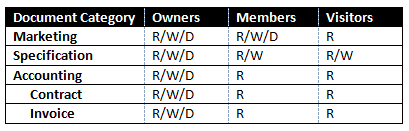
One task of such kind that business demands is to secure document based on the metadata values. In SharePoint 2007 it usually leads to custom development or purchasing one of the 3rd party products (like one from the Titus Labs), luckily SharePoint 2010 came up to help. Let's say we were asked to assign custom permission level on the document based on it's category, although to make it harder assume that document can have multiple categories.

The following picture shows security matrix to be implemented:

Here are the steps to achieve this using out-of-the-box Content Organizer feature, folder based security structure and Metadata Navigation.

1. Create "MD Document" content type
2. Add Managed Metadata column "Document Category" to the content type with the following Taxonomy
3. Add MD Document content type to a "Documents" document library.
4. Create three folders in a document library "Public", "Confidental", "Top Secret". Break permissions inheritance on these folder and assign desired permissions in accordance with security matrix.
5. Go to site settings and activate Content Organizer feature.
6. Add content organizer rule to route documents having Accounting category to a Top Secret folder.
7. Create rules for all category types. Less privileged category should have higher rule priority.

Starting from that point all documents that a user uploads to a Documents library will be processed by Content Organizer and placed in a secured folder based on a document category, i.e. secured based on the metadata.

A user will be informed by the following message in the upload document dialog:

And when category field is set up, document will be automatically routed:

Also, I like to use Metadata Navigation and Filtering feature in order to make navigation over categories more convenient. Activate this feature in Site Settings, go to document document library settings, then Metadata Navigation Settings and add Document Category column to the Selected Hierarchy fields. That will add a nice looking category tree to a documents list.

Tuesday, September 18, 2012

SharePoint 2010 Virtualization

With virtualization we can have multiple virtual servers(OS) on the single physical server. For example we can have web server, application server and database server on a single physical server.This approach not only help with cost reduction and maintenance but also with response time, high availability and scalability with business needs.

For SharePoint 2010 virtualization, Windows Server 2008 R2 with Hyper-V contains tool set which help to achieve reduces cost and increase performance.

Benefits of Virtualization:

1. Restore previous server instance: Administrator can take snapshot of the servers on timely basis so that if something goes wrong with server settings or installation, he can restore previous server's snapshot.
2. Virtualization tool-sets ensures that physical hardware like processor, RAM are used to the full capacity. For example: In a small physical farm, we have 2 web servers, 1 application server, 1 DB server. There are times when these physical servers are not used at full capacity. Virtualization handles these parameters dynamically in-turn increasing application's performance.
3. Multiple applications with different software requirement can sit on one physical server. For example: We have MOSS 2007 portal and SharePoint 2010 portal to deploy on PROD. We can create 2 different operating systems on same physical server using virtualization.          
4. We can scale up or down easily with virtualization. For example, a small organization can use virtualization to built small farm (2WFEs,1App,1DB) on single physical server and as organization grows they can easily add couple of physical servers instead of switch from stand alone to small farm. 
5. Dynamic memory distribution treats memory as shared resource that can be reallocated automatically among running virtual machines

Generally Indexing server and Database server are not virtualized because they actually consume all the resources of physical server and there is little scope of physical server's resource sharing using virtualization.

For virtualization best practices and configuration follow below link: http://www.microsoft.com/en-us/download/details.aspx?id=19508 

Thursday, August 23, 2012

SharePoint 2010 features


New Features in SharePoint 2010 are
1. SharePoint Health analyser
Quickly find and fix potential problems across all of the servers in your farm. The SharePoint Health Analyzer monitors farm health and can automatically fix many common configuration and performance problems automatically
2. Visual Upgrade
Upgrade to SharePoint 2010 but keep the SharePoint 2007 look-and-feel until you are ready to switch. Ribbon on page
3. PowerShell
4. Bookmarking, tagging and rating capabilities.
5. Content Type hub
6. Library item limit increased to 10 million from 5 million
7. Shared Service architecture changed to make it more flexible and ability to share accross farms. Every Service has have different user permissions. Services have there own DBs. Multiple instances of services allowed.
8. Web analytics capability enhanced
9. Sandbox
10. Can be installed on Windows 7
11. Workflows can be moved between Visio, Designer, Visual Studio. Site Workflow is new
12. New Event handlers
13. Claims based authentication
14. List Throttling
15. Developer dashboard
16. client object model, ECAMscript
17. Inline editing experience (Wiki page)
18. Managed Accounts
19. Multi-tenancy - Configuration: no CA, only by PowerShell scripts
20 RBS

MOSS 2007 to SharePoint 2010 migration


To perform an upgrade, you must have installed Office SharePoint Server 2007 with Service Pack 2 (SP2).

Inplace Migration and database migration
Need MOSS SP2 for migration. Pre Upgrade Checker to generate reports.
MOSS has 15,000 site collection limition for single DB whereas 2010 has 5,000 limition. So devide site collection into multiple db before upgrade.

We do have option to keep visual as 2007 for 2010.

Site Planning


SharePoint 2010 Versions: http://sharepoint.microsoft.com/en-us/buy/Pages/Editions-Comparison.aspx
Licensing Q&A: Determining Your Licensing Needs: http://sharepoint.microsoft.com/en-us/buy/Pages/Licensing-Details.aspx
Try Office 365 for free for 30 days: http://www.microsoft.com/en-us/office365/free-office365-trial.aspx#fbid=Z2H52GGA8QQ
Planning for server farms (SharePoint Server 2010): http://technet.microsoft.com/en-us/library/cc262936.aspx
Performance and capacity management (SharePoint Server 2010): http://technet.microsoft.com/en-us/library/cc262971.aspx

For intranet/extranet we need Client Access Licensing(CAL) Device/User based. In Production all instances of server needs SharePoint licensing. For development/staging server MSDN licensing is required.

In orginzation there can be 2 or more farm servers, 1. Intranet 2. Internet. Both have diffent licensing. We can install 2 license on the same farm. Extranet can include in either Intranet or Internet licensing. Intranet needs CAL.
1 farm can be dedicated to MYSITE if the users creating mysite are huge.

Small Farm - 2WFEs, 1 App server, 2 DB server(Search DB, other)
Medium Farm - Multiple WFEs, 2 App servers(Combined Query and crawl server, other services), 2 DB(search DB, other)
Large Farm - Mulitple WFEs(Seperate group for incoming request, group for crawling and administration), 4 group of app server(crawl, query, other, running sandbox code), 3 group of DB server(Search Server, Content DB server, others)

1 WFEs = 10,000 users, App server and DB depends on search and data.


Site collection are
1. Orgainzational sites: Combination of team site and publishing content site
2. Application sites: User interaction such as timesheet application
3. Publishing site: There is authorizing server, staging server and production server all in different web application for publishing content.

For single site collection DB cannot be more that 100GB(best practice) Here we have to split site collection into mulitple site collection if DB size goes more than 100BG.
By default every web application creates its own content db. While planning creating different site collection helps for scalability because if content db reaches 100GB we can move site collection to new content db by using Move-SPSite command.
Web application is used to redirect incoming http request to SharePoint sites. We should always consider below additional overheads before creating new web application.
1. Additional RAM required per Web app (even with 0 users) > more hardware required.
2. Timer jobs (around 30 per Web app, several of which run every few minutes (e.g. alerts & workflow) and many which run daily (e.g. workflow processing and gradual site deletions)
3. Content databases - per SQL instance limit, backup concerns, storage space
4. Application pools if isolating for security reasons
5. IIS sites > administrative overheads (host headers, IP addresses, SSL certificates, Web configuration files, assemblies).
6. Other operational overheads: DNS / request routing; SharePoint solution management

Multi-Tenancy can be done to web application as well as site collection. In 2010 we can do alternate access mapping to site collctions as well.
We can have 300 databases per web application.
Extend Web applications when you want to change authenication type or give different set of users different authentication and URL

SharePoint Logging


1. Gives the report for site and site collection usage information.

2. Unified logging service ULS logs - we can write custom logs by
SPDiagnosticsService diagSvc = SPDiagnosticsService.Local;
                diagSvc.WriteTrace(0,
                                                        new SPDiagnosticsCategory("Sowmyan's category", TraceSeverity.Monitorable, EventSeverity.Error),
                                                        TraceSeverity.Monitorable,
                                                        "Writing to the ULS log:  {0}",
                                                        new object[] { "SharePoint 2010 rocks!" });

3. Event logs - we can write custom logs by
 System.Diagnostics.EventLog.WriteEntry("Rahul", "Testing");

4. Store all logging information in new database from all the WFEs. So all logging info at one place.

5. customerrormode = off and CallStack=true to see the error call stack on page.

6. Custom applicaton page: there is new SPWebApplicaton.SPCustomPage enumerator which will replace OOB application page with custom page

webApp.UpdateMappedPage(SPWebApplication.SPCustomPage.AccessDenied,
          "/_layouts/CustomErrorPages/AccessDenied.aspx")

7. Develepor dashboard to view report of the page.

Sunday, July 15, 2012

Workflow SharePoint 2010


Types of workflows
1. Sequential Workflow
2. State Machine Workflow

OOB workflows
1. Approval
2. collect feedback
3. collect signature
4. disposition workflow

In designer, workflow has actions, steps, conditions. It has workflow settings page where we have "Tasks" List, "workfow history" list. "Workfow history" list is not visible in "list and library" on SharePoint site, we have to access it through url <siteurl>/lists/workflow history/

We have "Information management policy" tag in "list/library settings" - one of the policy is called retention policy where we can define OOB/custom formula of date when we can archive items from the list to recyclebin/permanent delete/to other location and more. Activate SharePoint Server Enterprise Site Collection feature to use this functionality

There are 3 types of workflow in designer :
1.List workflow - This workflow is associated with a list and cannot be used anywhere. Save as templete option is disabled and cannot be published globally. So no *.wsp is created
2.Reusable workflow - This workflow is associated with contenttype. So if you attach contenttype to list/lib its corresponding workflow is also associated with it. You can save this workflow as template therefore *.wsp is created which is saved in Site Assets library. We can import this *.wsp file into VS 2010 and work on it further. If you have created this workflow in the subsite then u cannot publish it globally. Publish Globally mean publish in a site collection.
3.Site Workflow - This workflow is independent of list or contenttype. You have to manually start this workflow. We cannot save this workflow as template.

Visual Studio workflow: Sequential workflow starts with OnWorkflowActivated event which has different corelation token than OnTaskCreated, OnTaskChanged, OnTaskDeleted.

private void createTask1_MethodInvoking(object sender, EventArgs e)
        {
            createTask1.TaskId = Guid.NewGuid();

            tasklistproperty = new SPWorkflowTaskProperties();
            tasklistproperty.DueDate = DateTime.Now.AddDays(1.0);
            tasklistproperty.AssignedTo = "waytous/rahul";
            tasklistproperty.Title = this.workflowProperties.Item["Title"] + " Review";
            tasklistproperty.ExtendedProperties["Comments"] = "Workflow has started...";

            createTask1.TaskProperties = tasklistproperty;
        }


private void onTaskChanged1_Invoked(object sender, ExternalDataEventArgs e)
        {

            tasklistproperty = onTaskChanged1_AfterProperties1;
            if (tasklistproperty != null)
            {
                if (tasklistproperty.PercentComplete == 1.0)
                {
                    isTaskComplete = false;
                    this.workflowProperties.Item["Completion Status"] = "Review Completed";
                }
                else
                {
                    SPListItem taskitem = this.workflowProperties.TaskList.Items.GetItemById(tasklistproperty.TaskItemId);
                    this.workflowProperties.Item["Completion Status"] = "Task Status " + taskitem["Status"].ToString() + " with " + tasklistproperty.PercentComplete.ToString();
                }
                this.workflowProperties.Item.Update();
                duedate = tasklistproperty.DueDate;
            }
        }

For OnTaskChanged we have to 1st define afterproperties and beforeproperties in Property tab.


        private void IsOnTime(object sender, ConditionalEventArgs e)
        {
            if (DateTime.Now.CompareTo(duedate) <= 0)
                e.Result = true;
            else
                e.Result = false;
        }
private void IsNotOnTime(object sender, ConditionalEventArgs e)
        {
            if (DateTime.Now.CompareTo(duedate) <= 0)
                e.Result = false;
            else
                e.Result = true;
        }
Ifelse statement u return the result back to e.Result.

Store Procedure SQL SharePoint 2010


SQL Database: To improve the retrieval speed(by reducing disk I/O operations and cosume fewer system resources) of rows from table or view, we have indexes. There are 2 type of indexes.
1. Clustered Indexes sort and store the data rows in a table or view based on their key values(values are columns). Their can be only one clustered index per table beacuse data rows can be sorted only in one order. 1 clustered index per table only. Primary key automatically creates clustered index for the table.
2. Non-clustered Indexes are pointers to key values of the data rows called as row locators. 999 non-clustered index per table only.

Indexes are automatically created when PRIMARY KEY and UNIQUE constraints are defined on table columns. Query optimizer evaluates and decides whether to go with indexes or with table scan. If there is no indexes, query optimizer has to go with table scan. Its upto us to design and create indexes that are best suited to your environment

use Rahul
go

create table Accenture
(
EmployeeID int constraint pk_empID primary key,
Employeename varchar(50) not null,
Employeesal int not null,
);

create table PFForm
(
PFNumber int constraint pk_pfnumber primary key,
EmployeeID int constraint fk_EmpID foreign key references Accenture(EmployeeID),
);

alter table pfform
add pfMoney int

alter table pfform
drop column pfMoney

insert into [Rahul].[dbo].[Accenture] values(10618060,'Rahul',50000)
insert into [Rahul].[dbo].[Accenture] (Employeesal,Employeename,EmployeeID) values(10618060,'Rahul',50000)

select * from Rahul.dbo.accenture

To work with store procedure.
 SqlConnection connection = new SqlConnection(@"Data Source=WAYTOUS\SHAREPOINT;Initial Catalog=Rahul;Integrated Security=SSPI;");
            SqlCommand cmd = new SqlCommand("dbo.SP_GetEmployee",connection);
            cmd.CommandType = System.Data.CommandType.StoredProcedure;
            int value = 500001;
            cmd.Parameters.Add("@EmployeeID", value);
            cmd.Connection.Open();
             SqlDataReader reader = cmd.ExecuteReader();
             while (reader.Read())
             {
                 string empid = reader["EmployeeID"].ToString();
             }


use Rahul
Go

IF  EXISTS (SELECT * FROM sys.objects WHERE object_id = OBJECT_ID(N'[dbo].[SP_GetEmployee]') AND type in (N'P', N'PC'))
DROP PROCEDURE [dbo].[SP_GetEmployee]
GO

use Rahul
Go

SET ANSI_NULLS ON
GO
SET QUOTED_IDENTIFIER ON
GO

CREATE PROCEDURE [dbo].[SP_GetEmployee]
-- Add the parameters for the stored procedure here
@EmployeeID int = null

AS
BEGIN
-- SET NOCOUNT ON added to prevent extra result sets from
-- interfering with SELECT statements.
SET NOCOUNT ON;

    -- Insert statements for procedure here
select * from Accenture where EmployeeId<@EmployeeID
END
GO


We can also use third party tools like Microsoft.Practice.EnterpriseLibrary.

Permissions SharePoint 2010


Permission are of 2 types:
1. Site Permissions: Less management and less error prone
2. Fine-grained Permissions: performance to access the content is reduced

Feature Stapling SharePoint 2010


Feature stapling is used when you want to add a feature in OOB site definition and for that we use feature.xml with always farm level scope and element.xml in which we mention FeatureSiteTemplateAssociation and its corresponding site definition abrivation TemplateName.

Custom Ribbon SharePoint 2010


Customization of Ribbon is possible by writing an element.xml and deploying it as a feature by adding Empty Element item in VS. Element.xml contains <Custom Action> tag, RegistrationID and RegistrationType and CommandUIDefinition which defines the ribbon location and UI and CommandUIHandlers tag defines the event that will fire on click

We also have Contextual tab group, Group, tab, Control

We have OOB cmdui.xml under layouts/global/xml/ which defines OOB ribbon control and events.
We can also add custom ribbon using web part and page component by using ECMAScript which i have not worked on till now.

Event Receivers SharePoint 2010


SPItemEventReceiver - Items
SPListEventReceiver - List Fields
SPWebEventReceiver - Web, Site
Before event - synchronous
After event - can be synchronous, asynchronous
spwebprovisioningprovider for provisioning. It needs to be associated with siteDefintion using assemblyprovisioning in feature.xml


Library Events:

1. Add single new item - adding,added,updating,updated.
2. Multple new item - adding,added
3. changing item
4. metadata edit - updating, updated
5. document and metadata edit - updating, updated, updating, updated
6. Checkedin - updating, updated, checkin
7. checkout -  checkout
8. undo checkout - uncheckout

User Profile Service Application SharePoint 2010

Plan for Social tagging in SharePoint 2010: 
Social Tagging consist of Social Tags, Note Board, Ratings and bookmarklets.

Social Tags and Note Board can be associated with pages, library, items and much more. We can add tags and notes by using "Tags and Notes" control in ribbon (Farm feature "Social Tags and Note Board Ribbon Controls") which also has privacy setting. All these activities are visible in My profile under "Tags and Notes" tab.
Rating are associated with library and list for which we need to activate "SharePoint Server Publishing Infrastructure" feature. Go to list settings -> Rating Settings -> Allow items in this list to be rated - Yes.

 Plan for Audience in SharePoint 2010:

An audience is defined by a collection of one or more audience rules and by whether all or only one of the audience rules must be met when evaluating membership. An audience rule can be based on membership in a Windows security group, membership in a distribution list, position in an organizational hierarchy, or by a user profile property. To define each audience rule, you must select an operand, operator, and value.
Once an audience has been defined, it must be compiled on a regular basis because the underlying user profile properties and membership in directory services and groups can frequently change. An administrator schedules the timer job that controls when audiences are compiled.
To support a specific audience, you may find that you need to add more profile properties or distribution groups.

Plan for Profile synchronization in SharePoint 2010:

Profile Synchronization : Connections to directory services - Each user that you want to have a profile in SharePoint Server must have an identity in a directory service. Using filters, we can choose to exclude profiles from synchronization.
Profile Synchronization : Connections to business systems - To import properties from a business system, you will need an external content type that brings the property value from the external system into SharePoint Server 2010.
Identify property mapping - To indicate that a user profile property comes from an external system, you map the property to a specific attribute of the external system. Certain user profile properties are mapped by default. You can only map a profile property to an attribute whose data type is compatible with the data type of the property. When you synchronize profile information, in addition to importing profile properties from external systems, you can also write data back to a directory service. You cannot write data back to a business system. Each property can only be mapped in one direction. You cannot both import and export the same user profile property. The data that is exported overwrites any values that might already be present in the directory service.
Synchronization groups : By default, SharePoint Server synchronizes groups, such as distribution lists, when it synchronizes user profiles. You can turn off this functionality from the Configure Synchronization Settings page of Central Administration. Synchronizing groups is only supported for AD DS.
Synchronization schedule : The first time that you synchronize profile information between SharePoint Server and external systems, you must run a full synchronization. After that, you should configure the User Profile Incremental Synchronization timer job to perform an incremental synchronization on a recurring schedule.


Plan for User Profile on SharePoint 2010:

user profile is a collection of properties that describes a single user, along with the policies and other settings associated with each property. Some of the enterprise social networking feature that user profiles support are: my sites, profile pages, people searching, organizational charts, enterprise search, social tagging and audiences.
New user profiles are created in the following ways:
  • If an authenticated user does not have a user profile, a new one is created using properties taken from the appropriate directory service when that user initially accesses his or her My Site.
  • One or more new user profiles can be created using profile synchronization.
  • custom solution can be developed to create user profiles. 
A user profile is composed of a set of user properties. Each user property provides an item of information related to a user. User property values can come from directory services, business systems, or user input. You can set policies on each user property in a user profile to help govern how the information in that property can be used
Plan of User profile includes: Identify stakeholders, Identify how the profile information will be used, Identify directory services and business systems, Determine which properties to include, Determine property details, Determine personalization settings policies, Plan for capacity


My Site on SharePoint 2010:

Plan and set up for MySite in SharePoint 2010 are as below:
1. One of the Best practice for setting up My Site is to create new separate web application with "My Site Host" template Site Collection at root level.
2. Configure wildcard inclusion managed path as 'personal' with this new web application
3. Configure My Site settings for User Profile Service application.
4. Enable Self-Service Site Collection for this new web application which allows auto site collection creation when user clicks on MyContent in MySite for the first time.
There are number of other factors involved in planning of My Site


Content Type and Site Column SharePoint 2010


To created and deployed custom Content type using both sharepoint object model and feature below are the details.
 For Custom content type using feature. We have feature.xml which points to element.xml. Element.xml has contenttype id which is inherited from one of the parent content type. We also have name,group,inherit, version under contenttype tag. If we have to add new field to the contenttype we have Field tag added to element.xml file with GUID, field type, name etc. Than we add FieldRef tag which points to the field required. Deploy your feature and enable content type in advance settings and apply contenttype to the list.

Contenttype id can be used as:- 0x0101 for document library from which it inherits, append 00 and then append GUID without punctuations. To crate child contenttype of this custom contenttype its append 01/02/03

Using SharePoint object model - Use site.fields.add(); to add site column. Use SPContentType and pass ParentContentType object in constuctor. Use Site.ContentType.add(). To add site columns to contenttype, use ContentType.FieldLink.add();

Example:- In an orginization, there are multiple team sites where the team manager uplaods project plan in the doucment library. Now we need 2 more fields of matadata added to project plan document library in every team site. This is where Content Types come into picture. So i will assocaite 2 site columns with content type and associate with all the project plan document library in site collection.

ContentTypeUsage class help to identify if the required contenttype is in use before deleting it. We can also use powershell script.

ContentType has to inherit from a parent contenttype. Its a parent child relationship. Inheritance model is little different here. If you make any changes in the parent contenttype then the changes will not be reflected in the child contenttype automatically. Developer has to push down manually or through code. Similarly for the list and libraries that inhert from content type internally makes a seperate copy of contenttype list and developer has to push down overriding any changes made in child contenttype.

We can also associate document template type to contenttype by both feature and SharePoint object model. Using documentTemplate tag and mention TargetName to document template name which resides under catalogs. Using Site.file.add() and SPContentType.DocumentTemplate = "DocumnetTemplate Name".

Associate Contenttype to list definition. Make changes in schema.xml and in ContentType tag we have ContentTypeRef tag which asks for ID

On Production we can update existing contenttype by 2 ways. Create a new contenttype with updated columns and in feature reciever code hide the old contenttype. Here element.xml gets execuated 1st and then the active feature method. The second way is update existing contenttype using sharepoint object model. Here we have to do push down by spcontenttype.update(true);

If we have multiple(3) content types associated with a list, then we need to have 3 different list views. For doing the same we have "Metadata Navigation" in list settings which gives herichicy of contenttype in left navigation to choice from. "Per-location view setting" is another option in list setting which help to map specific view with its corresponding create list view.

Content Type Hub is new is SharePoint 2010 where we can share a content type within multiple web application. For this we have to create content type in on of the site collection. Then create Managed Metadata Service Application and define this content type in its properties.


Sandbox SharePoint 2010


A sandbox is a restricted execution environment that enables programs to access only certain resources and that keeps problems that occur in the sandbox from affecting the rest of the server environment. These sandbox solution cannot use centain computer and network resources, and cannot access content outsite the site collection they are deployed in.

farm administrator can promote a sandboxed solution??? check

explain resources points and quotas

Sandbox assemblies are not deployed in GAC, instead when user access any functionality like WebPart the assembly is extracted from the deployed .wsp package and copied into C:\ProgramData\Microsoft\SharePoint\UCCache. The SPUCWorkerProcess.exe cannot copy file on the file system, Microsoft SharePoint Foundation Sandbox Code Service does it for us. This assembly copying can be done on backend application server as well. Thus assemblies in sandboxed solutions are persisted in the content database inside the solution package (.wsp)
file. Non-SharePoint assemblies cannot be deployed in a sandboxed solution.

Things which are possible in Sandbox: Binding of contenttype to list, content type, custom action for menu, the ribbon, administration page,event receiver, feature(Site, Web), Feature receiver, Fields(Field types that already exit in the farm), list/library instance/template, Master page, Module, Property bag, Designer WF, Site page, feature stapling, Web parts(connecting web parts not possible, derive from only System.Web.UI.WebControls.WebParts.WebPart), web template, localization.


Limitations: BCS, External DB, cannot call to the network so resources available on the server can only be accessed(external list or the list connected to other databases can be accessed), application pages,user control, site definition, web.config, cannot write to registry, assemblies that are not installed in GAC cannot be called e.g Microsoft.SharePoint.UserCode.dll,timer jobs, runwithelevatedprivileges, read write files on server, web.config, there is different restricted Microsoft.SharePoint.dll for sandbox, it cannot overuse system resources,.

Split page rendering system where w3wp.exe and SPUCworkerprocess.exe run together when a page which has sandbox components is rendered. When the page is completed loaded the page object in SPUCworkerprocess.exe is merged into w3wp.exe process.

When we go on services.msc Sandbox service is called SharePoint User Code Host Service and in CA is called Microsoft SharePoint Foundation Sandboxed Code Service. So these services should run on the server where the request is coming.

Who can deploy Sandbox solution: Site Collection admin is wsp contains assembly otherwise User with Full control permission level at root of site collection can deploy.

Data Access: Sandbox solution can access data only from the site collection.

Process running in: SPUCWorkerProcess.exe which has restricted permission.

Sandbox solution in partnership with full-trust proxies: Here in case you need to develop functionality which is restricted by Sandbox then you deploy your full trust proxy solution(runs in SPUCWorkerProcess.exe) at farm level and call it from sandbox solution. So this wont work in SharePoint online. Other way to do the same is use Client object model.

Farm administrator can block or unblock sandbox wsp through CA via Manage User Solutions

We can set quatas for 'Limit maximum resource usage per day' = [in points]. If the points go out of this limit all sandbox solution will stop automatically until the Solution Daily Resource Usage Update timer job runs, which typically occurs each night.


Planning for Sandbox Solution: Need performance or security. Sandbox has more worker and proxy processes than that of farm.

Plan for load balance sandbox solution code: 1. Local Load balancing 2. Remote load balancing.